Skip to content


We recently came across a sample of MedusaHVNC, a new remote access trojan (RAT) being sold as malware-as-a-service (MaaS). When we took it apart, we found a hidden virtual network computing (HVNC) module that opens a browser on a separate Windows desktop, out of sight of the victim.
The browser still runs on the victim’s device, so it can load an existing profile, including cookies and session state. This gives the operator access to live, logged-in sessions while the activity continues to come from the victim’s usual machine.
The seller’s website and operator panel show what MedusaHVNC claims to offer. Our sample reveals the other side of it, a five-stage infection chain ending in a native 64-bit payload with a hard-coded command-and-control (C2) server.
The Marketplace Listing and the Operator Panel
MedusaHVNC is promoted through a dedicated website and Telegram channel. Its advertised features include several functions associated with credential and session access.
“Mem Exec” is described as a way to run .NET and native payloads in memory, with an AMSI patch and ETW bypass. “Browser Recovery” is advertised as being able to extract passwords, cookies and browsing history.
The seller also lists Chrome, Edge, Brave, Firefox and Telegram as supported applications.
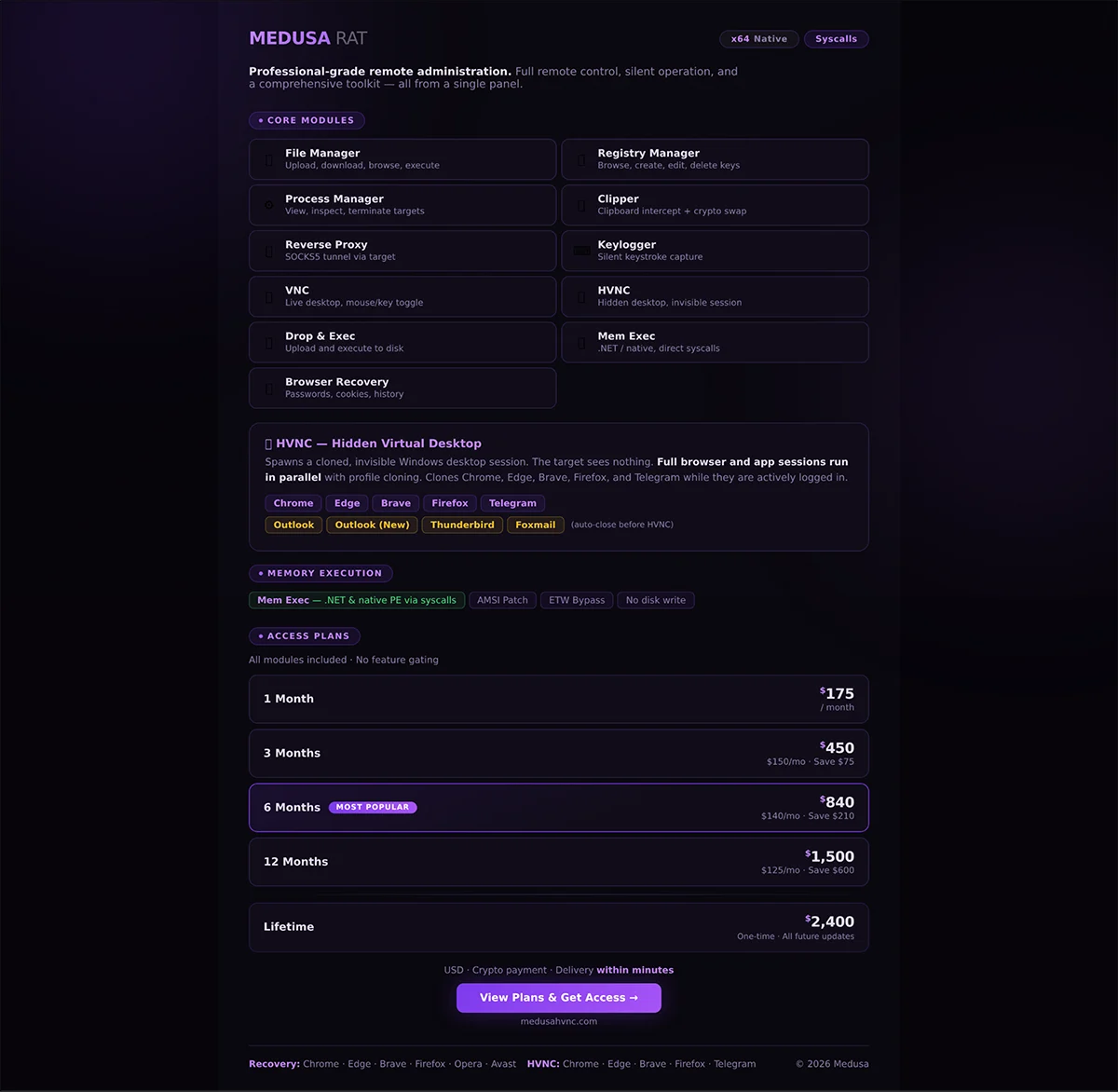
Figure 1: The MedusaHVNC sales page.
The client panel brings those options into one interface. An operator can select an application and configure the hidden desktop session.
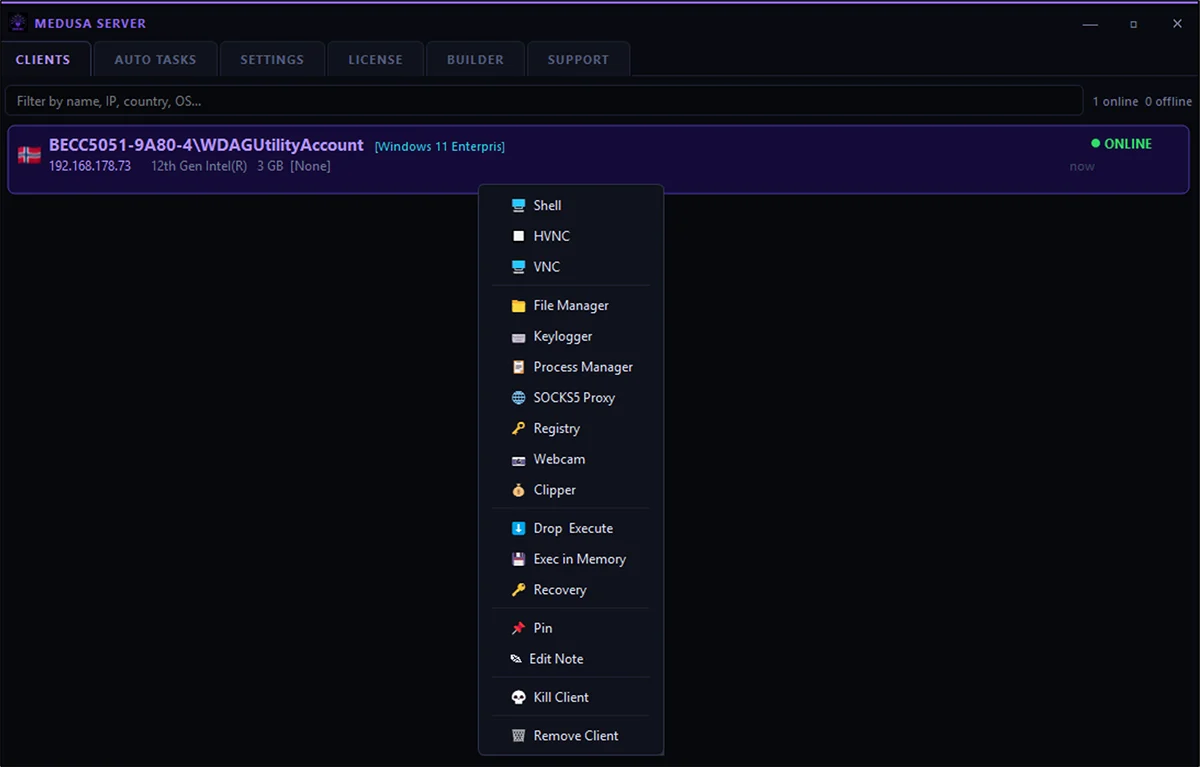
Figure 2: MedusaHVNC client options.
In a video we obtained, Google Chrome is open on Google’s homepage inside a hidden desktop. The browser appears to be signed in to an account, and the panel includes controls for frame rate and image quality.
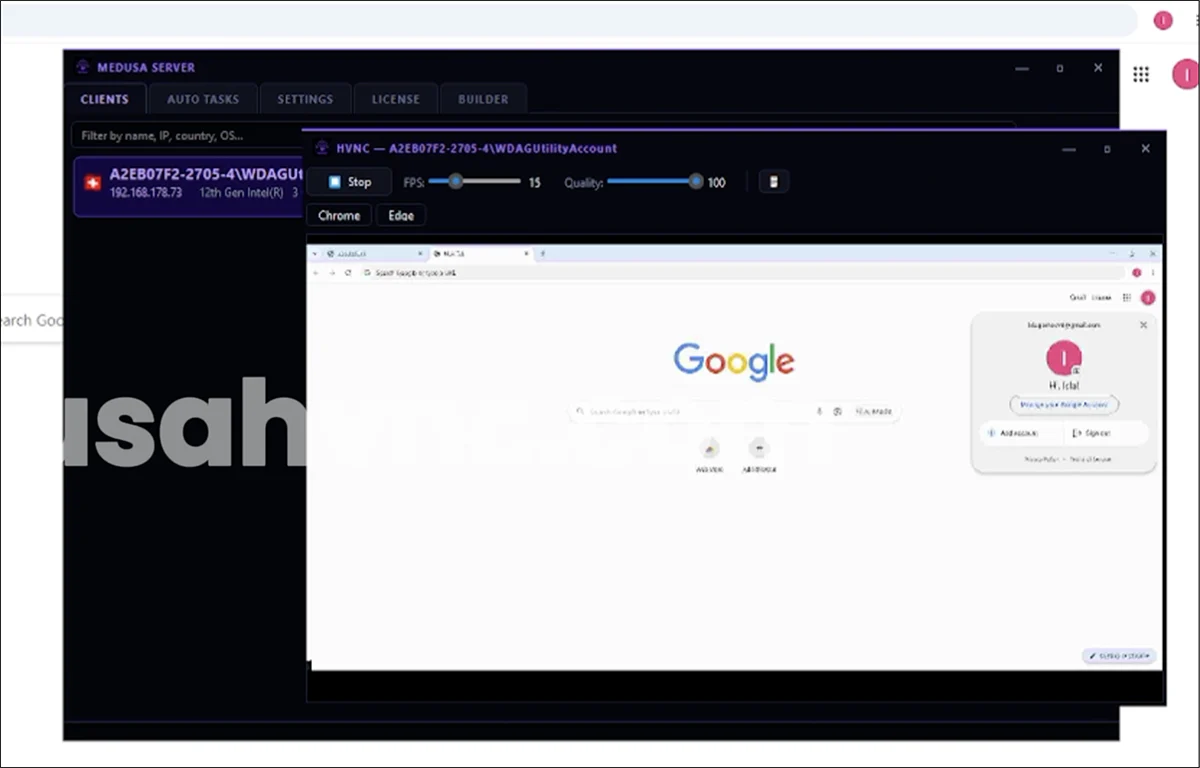
Figure 3: An active MedusaHVNC session.
The video captures the operator’s view once the hidden session is running. The sample itself reveals how MedusaHVNC builds it.
From JScript to a Hidden Implant
The chain starts with obfuscated JScript. We worked through each stage offline and checked our findings against available sandbox data.
- JScript Launcher
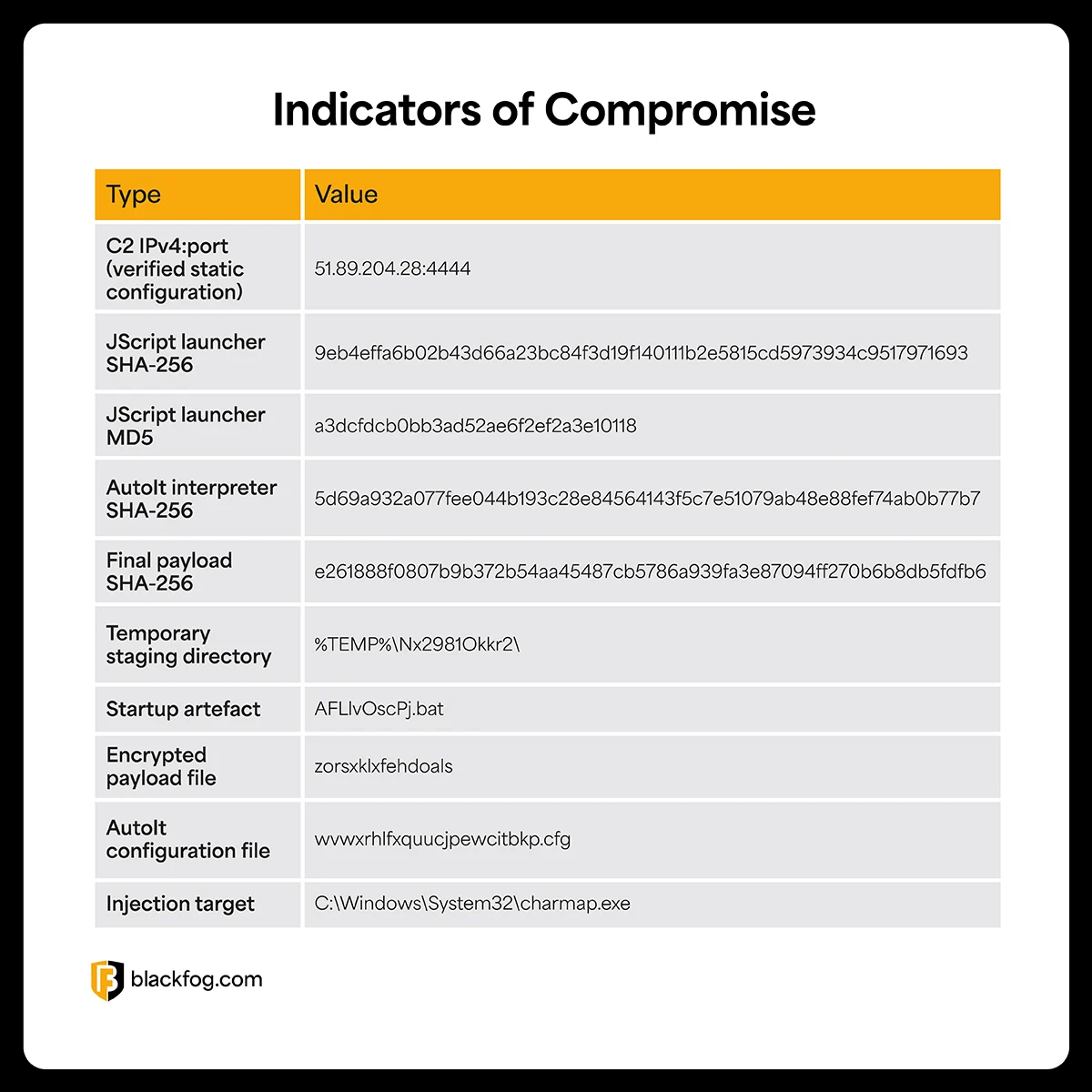
The chain begins when Windows Script Host, wscript.exe, executes the JScript launcher. The script pauses for 7,584 milliseconds before rebuilding its embedded files under %TEMP%\Nx2981Okkr2\. - Staging and Persistence
The script then writes several components to disk. These include an AutoIt interpreter named eepcxlhgdz.exe, a configuration file, and an encrypted payload with no file extension named zorsxklxfehdoals. It also places AFLlvOscPj.bat in the Startup folder. That gives the infection a way to run again after the system restarts. - AutoIt Decryption
The next stage uses AutoIt, a legitimate Windows automation tool. Running without a visible window, the AutoIt component decrypts the dropped payload with a single-byte XOR key, 0xAE. That produces the first native 64-bit executable in the chain. - Character Map Launch
The AutoIt stage then starts C:\Windows\System32\charmap.exe, the standard Windows Character Map utility. The public sandbox process tree shows charmap.exe as a child of the AutoIt process, and the loader is injected into it, using the trusted system binary as a host for the payload. The same sandbox run records screenshot capture during this stage. - Layered Unpacking
The loader now running inside charmap.exe contains two further encryption layers before the final payload. The first applies a 16-byte repeating XOR operation to 1,009,152 bytes from the .data section. The second uses ChaCha20 to decrypt 998,912 bytes of ciphertext with a 32-byte key, a 12-byte nonce, and an initial counter value of 1.
We replayed that unpacking process offline and recovered the final payload byte for byte. The recovered keys and offsets are redacted in the example below:
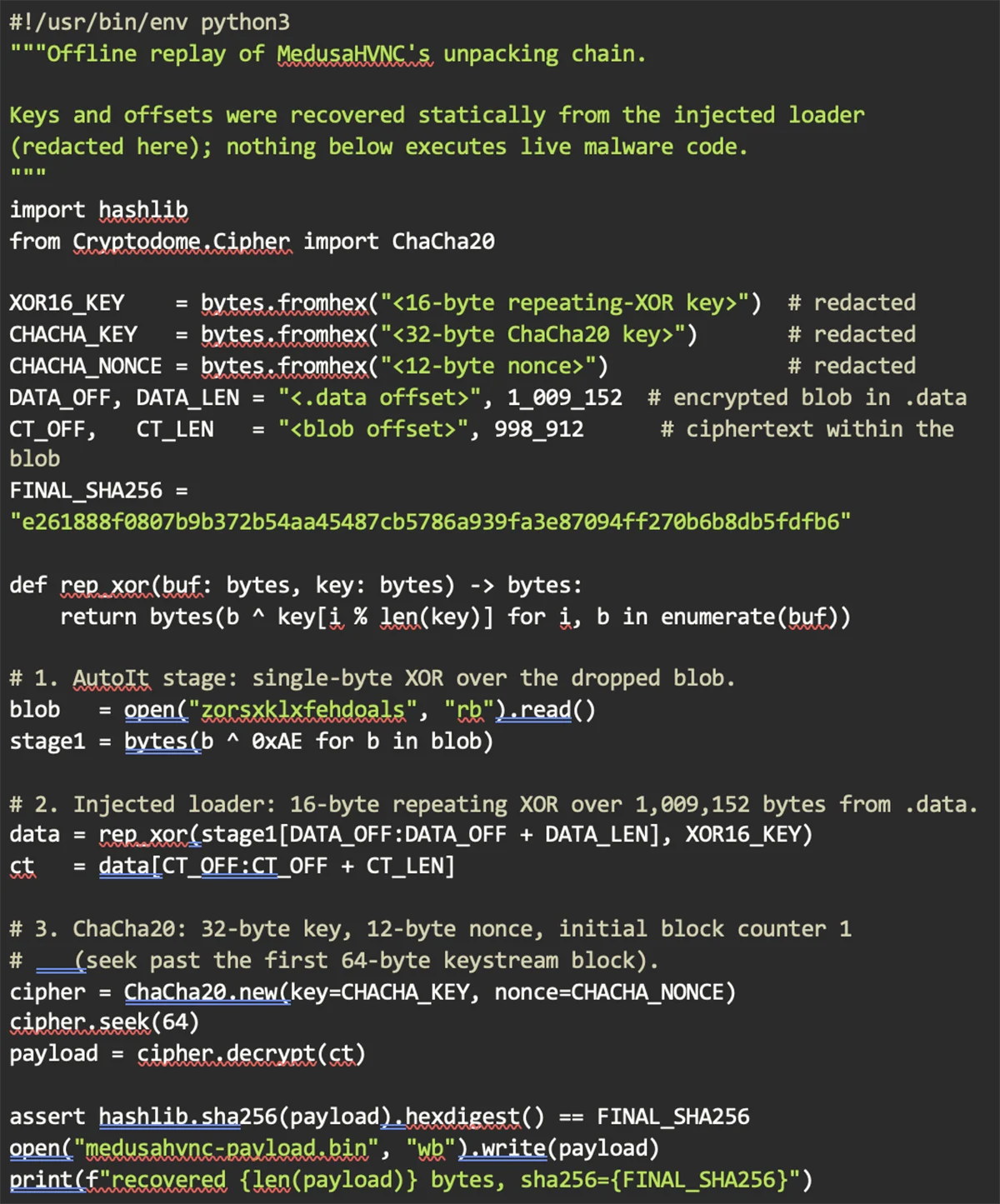
Figure 4: Redacted Python excerpt showing the offline unpacking process.
Recovering the final payload allowed us to move from the delivery chain to the HVNC functionality itself. The file is an unsigned PE32+ x86-64 console executable containing a .pay section and the family string MedusaHVNC.
The payload communicates with its operator over a custom TCP protocol using native Winsock functions, including WSAStartup, socket, connect, send, and recv. The C2 address 51.89.204.28:4444 is hard-coded into the binary.
The rest of the binary contains the components needed to interact with applications running on a separate Windows desktop.
Browser-specific strings reference Chrome, Edge, and Firefox. Functions such as BitBlt, EnumWindows, and PrintWindow support screen and window capture, while SendInput and SetWindowsHookExW are associated with synthetic input and interaction.
Clipboard functions, including OpenClipboard, GetClipboardData, and SetClipboardData, provide another way to move information into or out of the session.
Taken together, these findings are consistent with the core HVNC workflow. The browser references identify the applications involved, and the capture, input, window-management, and clipboard functions provide the mechanisms needed to observe and control activity inside the hidden desktop.
Defending Against MedusaHVNC
For the operator to use the hidden session, MedusaHVNC has to send it off the infected endpoint. That makes outbound traffic a practical place to detect and interrupt the attack, regardless of the loader or evasion technique used earlier in the chain.
An unapproved connection to an attacker’s server is the same event whether it comes from a browser or a native client. Blocking traffic to known C2 infrastructure and alerting on unexpected outbound connections works regardless of how the session was hidden. Blocking the C2 address and the hashes in the IOC table is a concrete starting point.
This is also the layer BlackFog’s anti data exfiltration (ADX) technology is built for. It watches outbound traffic on the device and blocks transfers to command-and-control servers in real time, regardless of which process opens the connection. If the hijacked session doesn’t make it out, the operator has nothing to receive.