Skip to content

RAG Poisoning has rapidly emerged as one of the most serious threats facing enterprise AI systems. Over the last 18 months, Retrieval-Augmented Generation (RAG) has become one of the default architectures behind enterprise AI systems. Copilots, internal AI assistants, and enterprise search tools rely on RAG to retrieve live corporate data before generating responses. The same retrieval mechanism that makes these systems useful, however, also creates a new attack surface.
Microsoft’s EchoLeak vulnerability showed how serious this risk can become.
Researchers demonstrated that a single malicious email could manipulate Microsoft 365 Copilot into retrieving sensitive information and exfiltrating it through rendered image requests without the user ever opening the message. The attack was widely described as one of the first real-world examples of a zero-click prompt injection exploit against a production AI system.
A single poisoned document, hidden instruction, malicious PDF, or manipulated knowledge base entry can quietly alter how an enterprise AI system responds to users. In some cases, attackers can use these hidden prompts to override safeguards, retrieve sensitive information, and exfiltrate corporate data through trusted workflows without ever deploying traditional malware.
How RAG Poisoning Works Step By Step
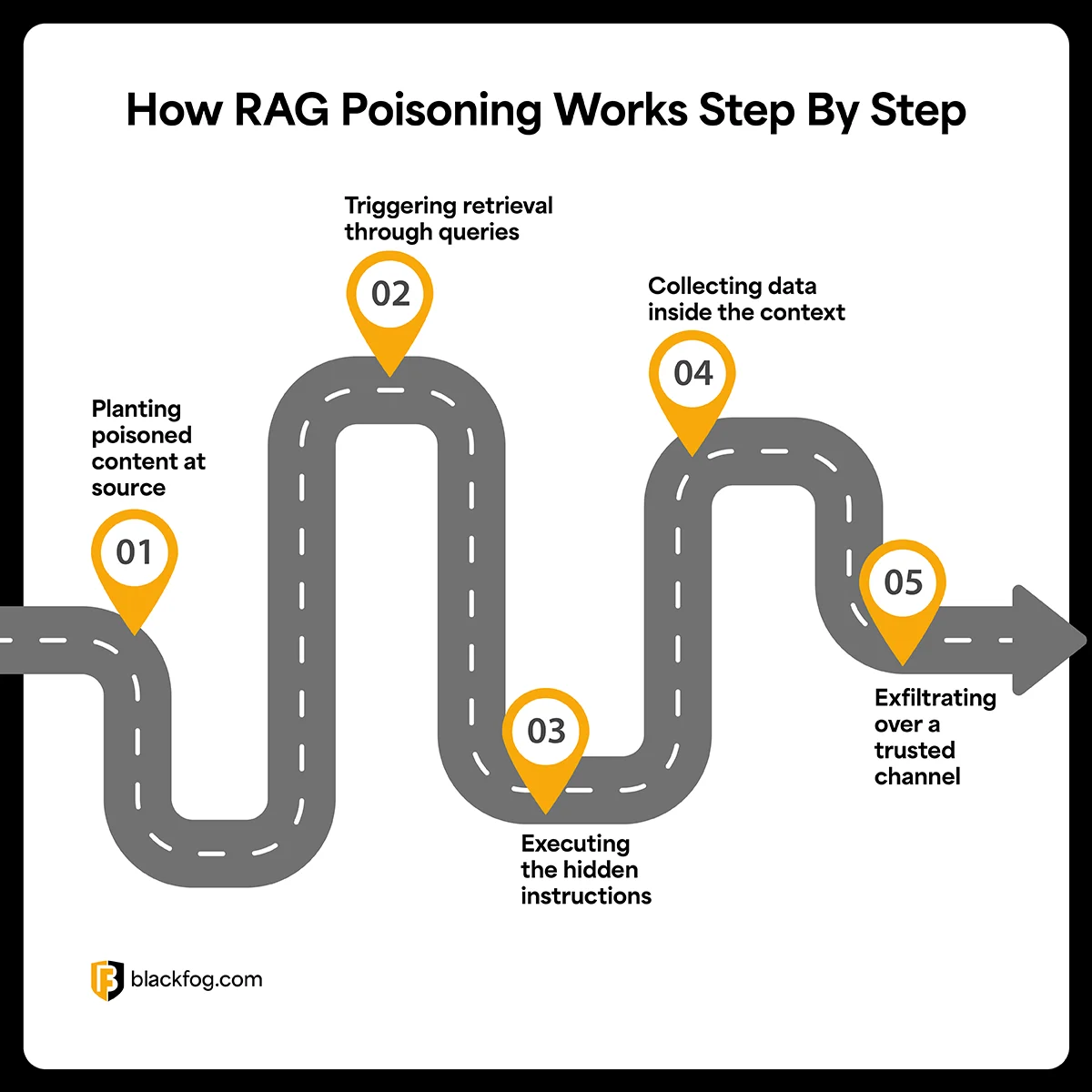
The attack chain runs through five stages, from content placement to exfiltration over a sanctioned channel.
- Planting poisoned content at source
The attack begins by placing malicious instructions inside a source the organization’s RAG pipeline can access. This could be a shared document, PDF, email, knowledge base article, cloud storage file, or internal wiki page. The instructions are usually hidden using techniques like invisible text, white-on-white formatting, tiny fonts, or encoded prompts designed to avoid human detection while remaining fully readable to the model. - Triggering retrieval through queries
Poisoned documents are often written around common business topics or keywords likely to appear in routine employee questions. When a user later asks the AI something relevant, the retrieval engine may pull the poisoned document into the model’s context window alongside legitimate corporate data. At that point, the malicious instructions are now sitting directly inside the AI’s working context. - Executing the hidden instructions
Once retrieved, the poisoned content is processed as part of the overall prompt. The hidden instructions begin competing with the system prompt for the model’s attention. Instead of simply summarizing documents or answering the user’s question, the model may start following attacker-controlled directives embedded inside the retrieved content. This could involve searching for sensitive files, revealing confidential information, or generating hidden outbound requests designed to move data outside the environment. - Collecting data inside the context
If the injection succeeds, the AI begins interacting with whatever data sits inside its retrieval scope. Depending on the permissions granted to the system, this may include internal documents, chat logs, emails, cloud storage, tickets, CRM records, or connected SaaS platforms. From the user’s perspective, the assistant often appears to behave normally. The malicious activity happens silently in the background while the model continues generating what looks like a legitimate response. - Exfiltrating over a trusted channel
The final stage is moving the stolen information out of the environment. One common technique involves embedding sensitive data into markdown image requests or outbound URLs generated by the model itself. The AI outputs what appears to be a harmless image or link, but when the user’s browser renders it, the request quietly sends encoded corporate data to an attacker-controlled server. Because the traffic travels through trusted platform functionality, the exfiltration can blend into normal application behavior and avoid traditional security monitoring.
The Detection Problem in RAG Poisoning
RAG poisoning is difficult to detect because the attack chain usually looks like normal enterprise activity. The email arrives through a legitimate inbox, the document gets indexed into the retrieval pipeline, the user asks a routine question, and the AI assistant retrieves context exactly as designed. From the outside, everything appears legitimate.
Traditional security tooling struggles because RAG poisoning avoids many of the signals those systems were built to detect. The payload is often just hidden text embedded inside legitimate-looking content rather than malware or an exploit chain. Stolen data may also leave through trusted SaaS platforms, browser requests, markdown rendering, or approved AI workflows already allowed inside the environment, making malicious activity blend into normal traffic.
How to Mitigate RAG Poisoning Attacks
With those detection limits in mind, mitigation has to carry more weight than usual. The retrieval pipeline, the content that flows through it, the privileges granted to the assistant, the outbound layer, and the assurance process around all of it need to be hardened.
- Restrict Markdown Image Rendering by Domain
The most common exfiltration path is a rendered image pointing at the attacker’s server, and Microsoft addressed EchoLeak partly by hardening Copilot’s content security policy. Internal RAG applications should allow only domains explicitly trusted for that environment. - Strip and Normalize All Retrieved Content
Before retrieved chunks reach the model, invisible Unicode, ANSI escape sequences, hidden HTML, and white-on-white text should be removed and the chunk re-encoded to a canonical character set. That breaks the common hiding tricks. - Apply Least Privilege to Retrieval Scope
A RAG assistant should retrieve only from sources the requesting user already has direct access to. Many enterprise deployments grant the assistant broader access than the user holds and rely on filtering downstream. That assumption made EchoLeak’s blast radius so large. - Inspect Outbound Activity at the Endpoint
Network and application-layer controls miss exfiltration through SaaS APIs. Endpoint instrumentation that watches what the AI assistant emits, regardless of sanctioned domain, catches what perimeter tools miss. - Red-Team the RAG Pipeline on a Schedule
Treat the knowledge base as an attack surface. Run prompt-injection assessments against every connector, document type, and tool integration before promoting model or connector changes to production. PoisonedRAG and the public proof-of-concept code from major disclosures are good starting points.
Take Your Next Steps With BlackFog
As we’ve seen above, RAG poisoning blends into normal enterprise activity extremely well. The AI retrieves approved content, answers a routine user query, and quietly moves data through trusted workflows already allowed inside the environment. By the time something looks suspicious, the sensitive data may already be gone.
That is where BlackFog ADX Vision comes in.
BlackFog ADX Vision helps organizations identify unauthorized AI tool usage and prevent sensitive corporate data from being exposed to Shadow AI platforms, unapproved copilots, or external large language models. By monitoring AI related activity directly at the endpoint, security teams gain visibility into how corporate data is being accessed, processed, and shared across AI enabled workflows.
You can learn more here: ADX Vision.