Skip to content

How to Prevent Ransomware Attacks: Key Practices to Know About
Ransomware attacks have become one of the biggest threats facing all businesses in the last few years. In 2024, for example, the number of attacks rose by 27 percent, according to Thales. What’s more, 93 percent of security pros agreed that this is a growing risk.
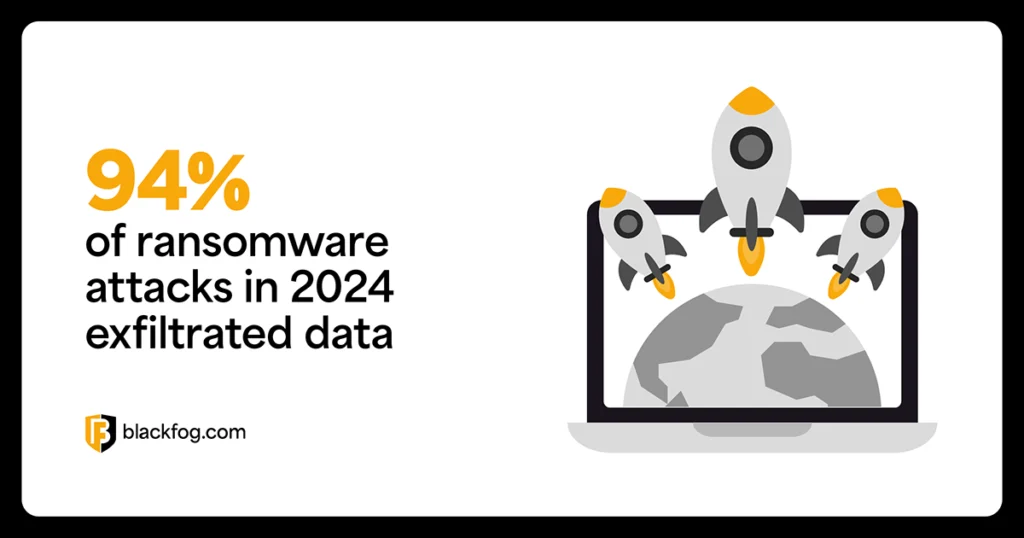
The biggest threat within this category is attacks that exfiltrate data. Our research found this was a factor in 96 percent of cases in 2025. This can be devastating, as in addition to any downtime a firm suffers, data exfiltration can leave it exposed to a range of issues, including:
- Costly ransom payments to prevent sensitive data from being leaked
- Reputational damage, especially if sensitive customer data is stolen
- Regulatory fines
- Class-action lawsuits from affected customers
Knowing how to prevent ransomware is vital in avoiding these issues, especially as, in some cases, a ransomware attack could even put a company’s future at risk. Read on to learn more about essential steps to protect against ransomware, why they’re necessary and how to implement them.
How Does Ransomware Spread?
To prevent ransomware attacks, organizations must first understand how they spread. This includes knowing exactly how companies get infected, what happens next and what can be done to both prevent and recover from these incidents.
The most common way for ransomware to enter a business is via emails. Employees falling victim to phishing attacks, for example, can accidentally download malicious software or hand over login credentials to hackers.
However, this is not the only way malicious software enters networks. Criminals may also take advantage of unpatched or as-yet undiscovered software vulnerabilities, cloud computing misconfigurations, use ‘malvertising’ via compromised web pages vistign by employees, or exploit remote access tools to gain entry to networks.
Once inside, hackers aim to move laterally and seek out the most valuable or sensitive data to exfiltrate and use in double extortion attacks. This is where firms still have a chance to stop a data breach, as once attackers have successfully exfiltrated data, it will be too late.
Ransomware prevention starts with visibility into the attacker’s path. Knowing how these threats enter allows security teams to focus on detection, reduce exposure and shut down threats before they escalate.
5 Best Practices to Prevent Ransomware Attacks
While there are a variety of mitigation strategies businesses can turn to if they do fall victim to ransomware, the best way to protect against it is to avoid infection in the first place. This requires a strong focus on data security throughout the organization and a range of preventative techniques. Here are some of the most important ransomware protection strategies that no business should be without.
1. Strengthen Network Security and Restrict Access
Perimeter defenses such as firewalls, email security tools and antimalware play a key role in preventing ransomware. These can’t provide 100 percent protection, especially against the most sophisticated attacks, but they are essential in setting the foundations.
Effective access controls are one of the best ways to prevent ransomware. Tools such as multifactor authentication (MFA) minimize the risks posed by compromised credentials. This should be combined with Zero Trust security models and the principle of least privilege to ensure user identities are confirmed and no individual has access to more files than they need to do their job.
Network segmentation is another important aspect. If threat actors can’t move laterally to access critical files like financial information, they lose a key lever for ransomware demands.
2. Train Employees to Detect Threats
Employee training is one of the most effective ways to prevent ransomware attacks, as staff are often the weakest part of any firm’s defenses. Estimates vary, but human error is thought to be a factor in anywhere between three-quarters and nine out of ten data breaches.
Regular security training is a must. This should focus on how to spot common attacks such as phishing attempts and social engineering. Common examples to watch out for include:
- Fake IT password reset emails: Claiming an account has been compromised and asking an employee to click a link to ‘reset your password’, which actually steals credentials.
- Spoofed messages from senior staff: Messages appearing to come from a CEO or manager, asking an employee to approve an urgent invoice or open a document attachment.
- Impersonated tech support calls: A caller pretending to be from internal IT support, requesting remote access to a device to ‘fix a problem’.
- Phony HR update requests: Emails directing individuals to update personal or payroll information on a spoofed internal portal, used to harvest credentials or install malware.
- MFA fatigue attacks: Bombarding users with repeated MFA prompts in hopes they’ll approve one out of frustration or habit, granting attackers access.
3. Keep Software and Systems Updated
Hackers exploiting vulnerabilities in outdated software is another major cause of ransomware. To avoid this, it’s important to have a clear patch management strategy and a schedule for updating operating systems, applications and any third-party software. This can be especially challenging for large businesses with sprawling networks, so the use of automated tools to help the process can be highly beneficial.
To effectively prevent ransomware attacks taking advantage of outdated systems, there are a few key principles that firms must bear in mind. These include:
- Patch prioritization: Always apply updates for critical vulnerabilities first, especially those known to be actively exploited in the wild.
- Don’t overlook third-party and SaaS apps: Common business tools like file-sharing platforms, collaboration software and browser plugins are frequently targeted but often missed in patching cycles.
- Automate wherever possible: Use patch management tools to track, schedule, and apply updates across all endpoints, reducing the risk of missed updates or delays.
One example of where poor patching can cause issues is the 2023 MOVEit ransomware attacks, where threat actors exploited an unpatched zero-day vulnerability in Progress Software’s MOVEit Transfer tool. Despite a patch being released, many organizations failed to apply it in time, leading to widespread data breaches and ransomware deployment across multiple industries.
4. Back Up Data Regularly
Regular backups are essential in guarding against ransomware that encrypts or destroys files. While this doesn’t directly prevent ransomware, the more thoroughly and strategically it’s done, the less disruptive an incident will be. This reduces downtime, limits data loss and removes the pressure to pay a ransom, making organizations a less appealing target.
A strong backup strategy should be based around the 3-2-1-1 rule to ensure maximum protection. This means having:
- 3 copies of your data
- 2 stored on different media
- 1 copy kept offsite
- 1 copy kept immutable (unable to be changed or deleted)
Adding immutable backups ensures attackers can’t tamper with restore points, while continuous or near-real-time backups help minimize data loss during fast-moving attacks. Together, these practices ensure recovery is possible without giving in to ransom demands.
5. Implement Advanced Endpoint Protection
Strong endpoint protection helps detect ransomware early and stops attackers from exfiltrating sensitive data. There are a range of technologies that can be deployed to assist with this, including:
- Endpoint Detection and Response (EDR): Monitors endpoint activity for suspicious behavior like file encryption or privilege escalation.
- Extended Detection and Response (XDR): Correlates data across endpoints, networks and cloud systems to detect complex, multi-stage attacks.
- Managed Detection and Response (MDR): Provides 24/7 outsourced threat monitoring, alert triage and incident response from cybersecurity experts.
While these tools help detect and respond to threats, on-device anti data exfiltration (ADX) offers a critical final layer. This sits directly on the endpoint and learns what normal behavior looks like, blocking unauthorized data transfers in real-time. This stops attackers from stealing data even if they bypass other controls, disrupting ransomware before encryption or extortion begins. Together, these technologies provide layered, proactive defense, but ADX ensures that even if ransomware gets in, it can’t get data out.
Taking Proactive Steps Against Ransomware
Businesses cannot rely solely on tools like antimalware software to protect against ransomware. Instead, they must take an approach that emphasizes continuous updates, effective communication with employees and specialist ransomware solutions such as ADX to address the ever-evolving threat.
Preventing ransomware attacks requires proactive, layered defenses, not just reactive solutions. Implement these key tips and you’ll stand the best chance of strengthening your ransomware prevention strategy:
- Have a clear response plan that outlines roles and immediate actions during an attack.
- Run regular security audits and penetration tests to uncover vulnerabilities.
- Limit admin privileges and remove unused accounts to reduce access risk.
- Stay informed about new threats by following trusted cybersecurity sources.
- Keep all systems patched, including third-party and SaaS applications.
- Train employees to recognize phishing, social engineering and MFA fatigue tactics.
- Use ADX to block unauthorized data transfers at the endpoint.