Skip to content
AI tools are now used across almost all business operations, often with no IT approval or security oversight. This is a common reality faced by all enterprises, regardless of size or sector, with employees turning to consumer chatbots and AI-enabled apps to speed through daily tasks. Left unchecked, this unsanctioned activity can lead to a wide range of problems, from compliance failures to a heightened risk of costly data breaches. Yet in many cases, these individuals do not even realize the potential exposure they create.
Detecting these tools is the first step toward addressing the shadow AI economy before it causes lasting damage. By understanding exactly where and how shadow AI tools are used, firms can protect sensitive data, maintain regulatory compliance and avoid severe reputational risk.
How to Detect Shadow AI: Why It’s So Hard to Spot
Part of what makes shadow AI so difficult to catch is that much of it happens outside approved channels. For instance, usage on personal devices or through consumer apps often blends into everyday web activity. Encrypted connections hide what is being sent, while staff won’t be open about it if they know they’re acting outside of defined usage policies.
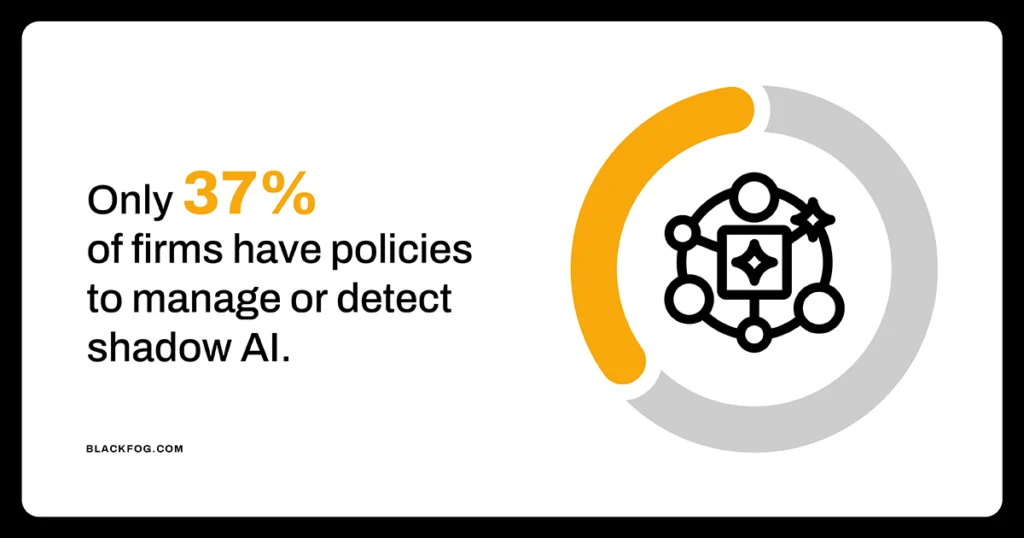
Understanding how to detect Shadow AI is further complicated by weak oversight, as many firms do not have solutions in place to spot such activity. Figures from IBM, for example, indicate that only 37 percent of organizations have policies to manage AI or detect shadow AI. The result is a widening gap between what security teams believe is happening and what is actually taking place.
5 Signs Of Shadow AI In Your Organization
Since unsanctioned AI use goes undeclared, spotting it means watching for indirect clues. The five signs below are essential things for firms to look out for. Any one alone may be innocent, but several together point strongly toward hidden AI activity.
1. Increased Connections To Unknown Or Unapproved Domains
Every device on a corporate network leaves a record of the sites it connects to, making network logs a reliable place to find shadow AI. The telling pattern is a rising number of connections to unknown or unapproved consumer AI domains, especially when the same tools are reached by growing numbers of users or connections are clustered within teams. Catching this depends on someone actively reviewing the logs, not assuming all is well. However, there are limitations to this approach. A common blind spot is personal devices and home networks, which never pass through corporate systems.
2. Unexplained App Integrations
Modern AI tools are highly interconnected, with many plugging directly into the systems staff already use. This can include CRMs, email inboxes, cloud storage and project management platforms, among others. When these connections appear without IT approval, often granted through a quick OAuth permission screen, they are a strong indicator that employees have added unsanctioned AI into core workflows. This creates significant risk, because an integrated tool or agent can read, extract and act on company data continuously in the background. Auditing which third-party apps hold access to key systems is the fastest way to surface them.
3. Sudden Changes In Output
Not every sign of shadow AI shows up in a system log. Some of the clearest clues are behavioral. An employee whose output suddenly jumps in volume, who completes tasks much faster than before or whose work shifts noticeably in tone, structure or polish may be leaning on an AI tool to produce it. Watch too for work that strays outside someone’s usual expertise, or a uniformity of style spreading across a team. On their own, these shifts prove nothing, since people genuinely improve and adopt new habits. Treat them as prompts to look closer rather than conclusions in themselves.
4. Unfamiliar Browser Extensions
Browsers are one of the easiest routes for AI to enter the workplace. Staff may add extensions that summarize pages, draft replies or take meeting notes. These add-ons can read whatever appears on screen, then pass it to external servers, making them a serious security risk. However, IT teams can surface them through browser management consoles or endpoint software inventories. Harder to detect are AI tools that are built into the browser, such as Gemini in Chrome, which no extension list will show. Spotting these means checking the enterprise AI policies governing these features, as many are active unless an administrator disables them.
5. Rising AI Access Requests
A growing stream of requests to approve, expense or whitelist AI tools often means employees have already been using them and now want to do so openly. This should be viewed as an opportunity rather than just an alarm. It means staff know exactly which tools they find valuable, giving the business a clear steer on what to provide through secure, sanctioned channels. Meeting that demand can help tackle unmanaged risk while removing the incentive to keep operating in the shadows.
Turning Shadow AI Detection Into Control
Good detection is a key first step in addressing shadow AI – but it is only the start. A one-off audit captures a single moment, which isn’t enough when tools and behaviors shift constantly. Monitoring for the above signs has to be continuous, tracking how AI use evolves. It also has to focus on the right areas. Network-level approaches miss activity on personal devices, off-network sessions and AI features embedded inside approved software, so genuine visibility depends on watching at the endpoint, where data actually connects with these tools.
From there, detection of AI becomes control of it. What monitoring reveals should feed directly into clear usage policies, capable sanctioned alternatives and automated enforcement that acts without waiting on human memory. Handled this way, AI shifts from an unmanaged liability to a governed part of operations. In a fast-evolving world, full understanding of where and how AI is used is what keeps sensitive data, compliance and reputation protected.
Shadow AI Detection FAQs
What are the early signs of shadow AI use?
Common indicators include a rise in connections to unapproved AI domains, AI tools being integrated into business systems without sign-off, sudden changes in output, unfamiliar browser extensions and growing requests to approve AI tools.
Can shadow AI be detected without network-level tools?
Yes. Behavioral cues like sudden shifts in output, audits of third-party app permissions, browser extension inventories and rising access requests all reveal shadow AI without touching network logs, though combining methods gives the fullest picture.
How often should organizations audit for shadow AI?
Continuously, rather than as a periodic exercise. AI tools and usage patterns change too quickly for occasional audits to keep pace, so ongoing monitoring at the endpoint offers far more reliable protection than a scheduled check every few months.
Does detecting shadow AI require special software?
Not to begin with. Existing network logs, admin consoles and app permission reviews reveal a lot. Dedicated endpoint tools become valuable for the gaps these miss, such as personal devices, off-network use and AI built into approved software.