 Skip to content

When using the BlackFog on Google Chrome for Windows you may notice that not all advertising and data collection is blocked. While BlackFog will block 90% or more, some advertising and data collection may still be possible.
Recent versions of Google Chrome employ a feature called Async DNS. This feature bypasses the normal operating system mechanisms for resolving domain names and uses the browser directly. In this mode, DNS requests will uses SSL to communicate directly with Googles own DNS servers and some third party providers. As a result you may see some Ads leak through the browser.
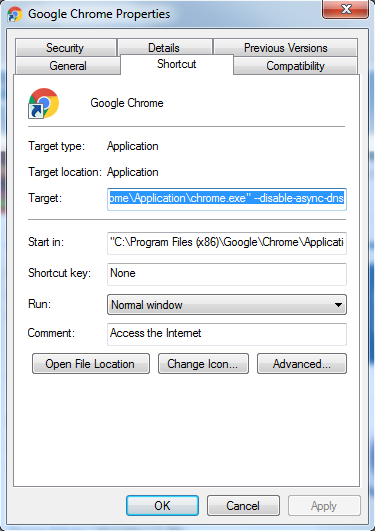
To disable this feature and provide 100% coverage you can disable Async DNS by changing the shortcut to Chrome within Windows.
- Edit the properties of Google Chrome and append “–disable-async-dns” to Target as shown below.
- Now start Chrome from this shortcut.
- Enter “chrome://net-internals/#dns” and click “Clear Host resolver cache”
You will now be using the normal DNS resolution and should see that all Ads and Data collection activity has been stopped.
Important
Note that this only works if you open Chrome using that specific shortcut (not from the taskbar search, Start menu, or a pinned icon pointing elsewhere), since the settings change is tied to that one shortcut’s target. If Chrome was already pinned to your taskbar, you may need to re-pin it from the edited shortcut for the change to apply there too.
- Find your Google Chrome shortcut (the icon you click to open Chrome; usually on your desktop or taskbar).
- Right-click the icon and select Properties.
- In the Properties window, find the “Target” field.
- Click at the very end of the text in that field and add a space followed by:
--disable-async-dns(note: that’s two dashes, not one, before “disable”). - Click OK to save.
- Close Chrome completely if it’s open, then reopen it using that same shortcut.
- In the address bar, type
chrome://net-internals/#dnsand press Enter. - In the left-hand navigation menu, select DNS.
- Click the button labeled “Clear Host resolver cache.”